
Help, I can no longer log in to iPROT!
Time and again we receive support requests that the login suddenly no longer works. In this article, we summarize all conceivable causes of errors and tell you how you can help yourself — and who you can turn to if this doesn’t work.
iPROT address, e-mail address and password
We know from ten years of support experience: The most likely cause of errors is that you log in to the wrong page, use the wrong e-mail address or enter the wrong password. “I know these details, I use them every time I log in!”, you might object. But is that really true? You have probably bookmarked iPROT in your browser, and the browser has also memorized your e-mail address and password. That’s why the login usually works like magic.
But now you don’t want to log in on your company notebook, but on your tablet or another PC. The office automation fails, and after the first login attempt has failed, you start to ponder. What is really my password? But first things first:
- Login address
- E-mail address
- password
The login address for iPROT is always https://iprot.eu/firmenname. It is important that you write the company name exactly as it was entered when you created the iPROT account – in upper and lower case, with or without hyphens, etc. If you use the wrong login address, an error message will appear instead of the login box.
Tip: Look up the address on your office notebook. If you have an iPROT Meeting minutes e-mail in your mail directory, the correct login address can also be seen at the beginning of the download link. If this is https://iprot.eu/meine-firma/download?id=1234, then the correct login address is https://iprot.eu/meine-firma. For demo accounts, the login address is https://iprot.eu/demoNNNN, where NNNN is a multi-digit number.
The correct e-mail address is the one that is set in the iPROT user administration. This statement sounds trivial, but be careful: Perhaps you (or your employee) have changed the e-mail address from mein.name@eine-firma.de to office@eine-firma.de? Then you must also use this e-mail address when logging in in the future!
We do not recommend this procedure. It is better to always use your “real” e-mail address to log in. If you want a different e-mail address to be used for the Meeting minutes of a project, it is better to either set a project e-mail address(Project settings, item Sending e-mail address; this address applies to the entire project and is used as the reply address for all mails relating to this project), or to use a project-specific address ( User settings dialog, dialog item Project-specific e-mail address; this address is specified within the Meeting minutes instead of its own address, e.g. on the attendance list). Also take a look at this blog post!
We have sent you your password by e-mail. Perhaps you can still find this e-mail? However, for good reason, the e-mail contains a request to change the password immediately for security reasons. If you have followed this advice, you can still search for the now valid login password in the web browser settings of your office computer.
If you have really forgotten your password, we will not be able to find it out either. We never save passwords in plain text. Simply ask an iPROT user within your company who has admin rights to reset your password (see the following heading)! You will then receive an e-mail with a new password. From now on only this password is valid, the old password is no longer valid.
Self-help
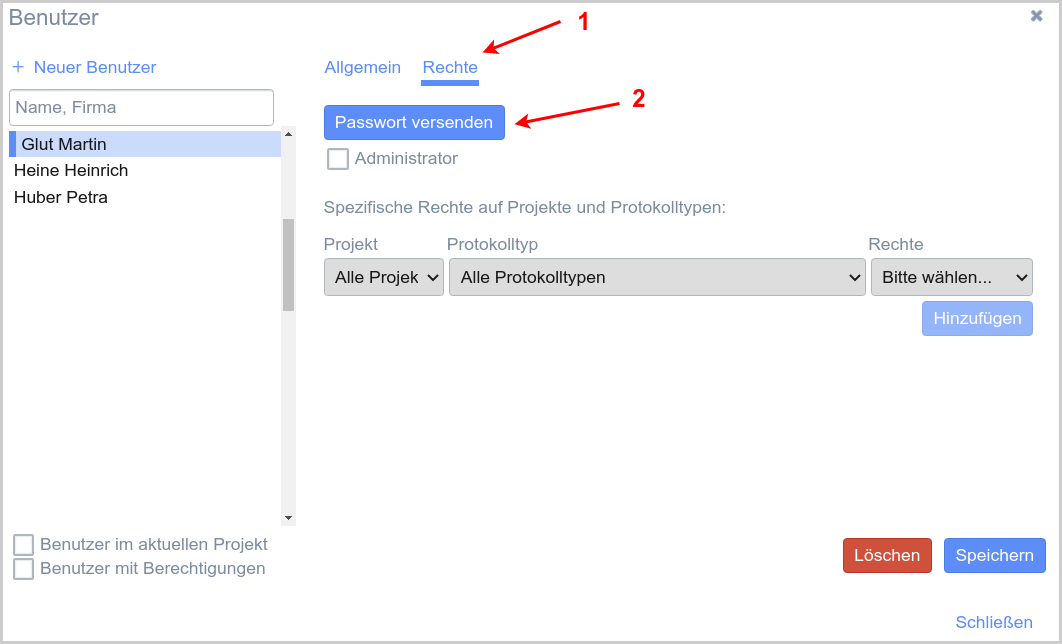
Normally there are several users within your company who have administrator rights for the iPROT account. Each of these users can see in the user administration which e-mail address their login is linked to. If required, all admin users can create a new password for their login at any time!
Other causes of errors
In Austria they say: Ohne Geld ka Musi, in High German: Ohne Geld spielt keine Musik. In the context of iPROT, this means that if you or your company do not pay the invoice for iPROT despite a reminder, we will ultimately block your login. You know what to do 🙂
Another rare error: The login succeeds, but then a message appears saying that you do not have the rights to use iPROT. This message appears if you have neither administrator rights nor write or read rights to any project within iPROT. Ask someone in your company who has admin rights to give you sufficient rights for your work. This setting option can be found in the user dialog shown above.
Support
If nothing helps, we will help! Send an e-mail to support@iprot.eu. Please state your iPROT account name in the e-mail — and ideally also attach a screenshot showing the address (URL) of the page on which you are logging in.

